Monitoring Voice and Chat Queues Together in Amazon Connect
Monitoring Amazon Connect voice and chat queues together helps supervisors see where demand is building across the operation. Keep each channel identifiable so that a shared view improves awareness without hiding meaningful differences.
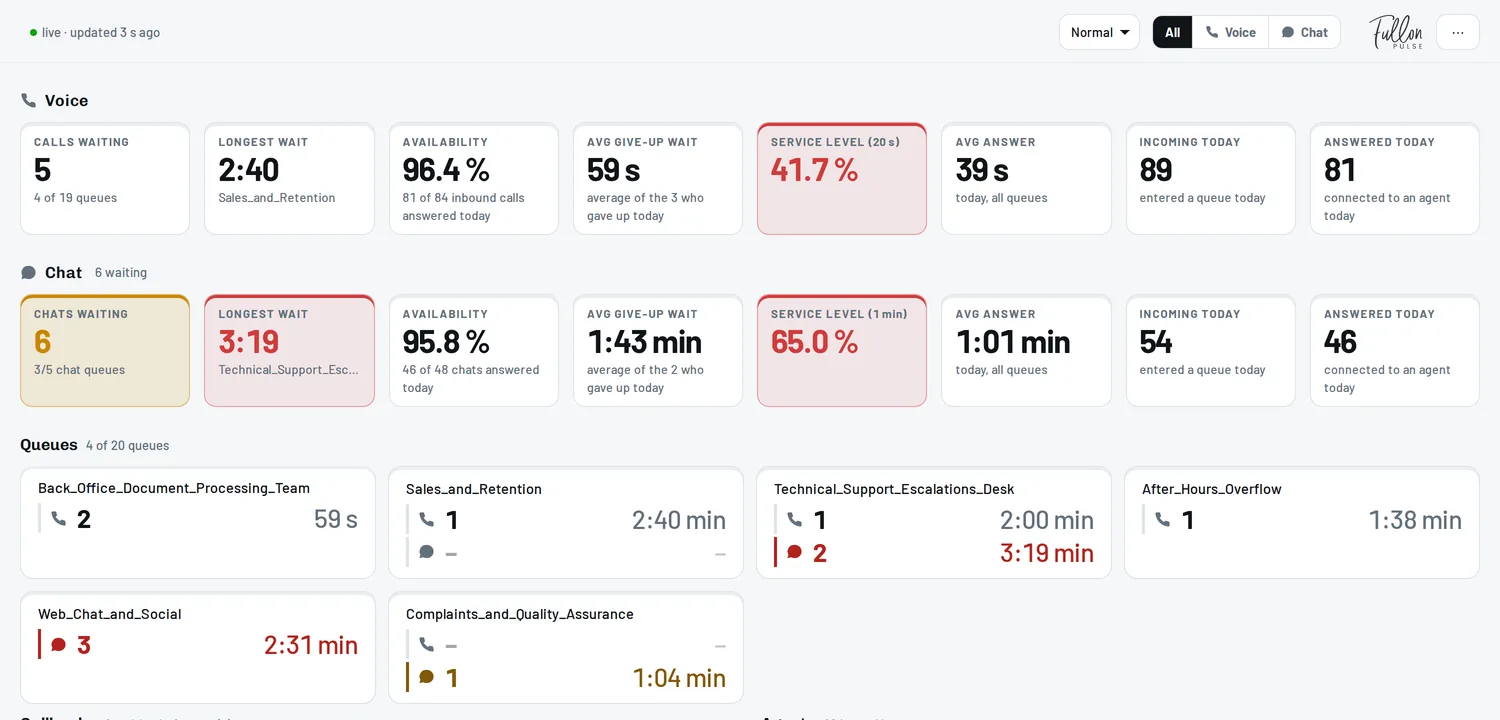
A combined screen should help answer two questions: where does the team need to investigate, and what options are available to respond?
Fullon Pulse supports that shared view by displaying voice and chat queues side by side, with the option to examine the channels together or separately in the browser.
Keep channel identity visible
Use clear queue and channel labels. A total across voice and chat can be useful as a broad indicator, but it should not replace the detail supervisors need to make decisions.
For example, the overall waiting workload may appear steady while demand shifts from phone support to chat. Without channel visibility, that change may be hard to notice.
Keep service expectations clear as well. If the business has different targets for different channels, display and discuss the results in that context.
Do not treat contact counts as equivalent workloads
A waiting voice contact and a waiting chat are not necessarily interchangeable units of work. The way conversations are handled, the complexity of requests, and the organization's operating model all affect what a team can manage.
Use the shared view to identify a possible imbalance, then examine the relevant channel before deciding how to respond. Avoid deriving a staffing move from a combined count alone.
This is especially important when the same people support both channels. A quiet-looking queue does not automatically mean the associated team has spare capacity.
Check how routing and concurrency affect capacity
Amazon Connect routing profiles define the queues and channels agents handle, with concurrency settings affecting how contacts can be assigned. Review those settings when evaluating whether colleagues can assist another channel.
Operationally, this means a proposed response needs both a people check and a configuration check. Are the colleagues prepared to handle the work, and does their setup support the intended assignment?
The monitoring view can reveal the need for that conversation. It does not replace it.
Use a channel-specific response sequence
Consider an illustrative situation: voice conditions remain stable while the chat queue starts growing. The supervisor first confirms that the increase is continuing, then checks the chat team's current workload and any known operational issue.
If additional cover is appropriate, the supervisor coordinates with qualified colleagues and the person responsible for any required configuration. Afterwards, both voice and chat remain under observation so that the response does not simply move the problem elsewhere.
The same logic applies in reverse when phone demand increases. Keep the response tied to the affected work rather than assuming one channel should always take priority.
Make the handover cover both channels
Shift notes should identify which queues need continued attention and what action has already been taken. Mention the channel explicitly, particularly when queue names are similar.
Keep ownership clear if different supervisors manage voice and chat. Shared visibility works best when it supports coordination between named owners.
Bring the channels together with Fullon Pulse
Fullon Pulse makes voice and chat queue information available on wall displays, in browsers, and through mobile apps. A shared view gives supervisors a starting point for discussing demand across the operation, while separate channel views support a more focused review.
Use our wallboard guide to plan the display and our queue monitoring guide to define the routine behind it.
Explore Fullon Pulse for voice and chat queue visibility across your team.